Is MapToSite a Linktree alternative for a local shop?
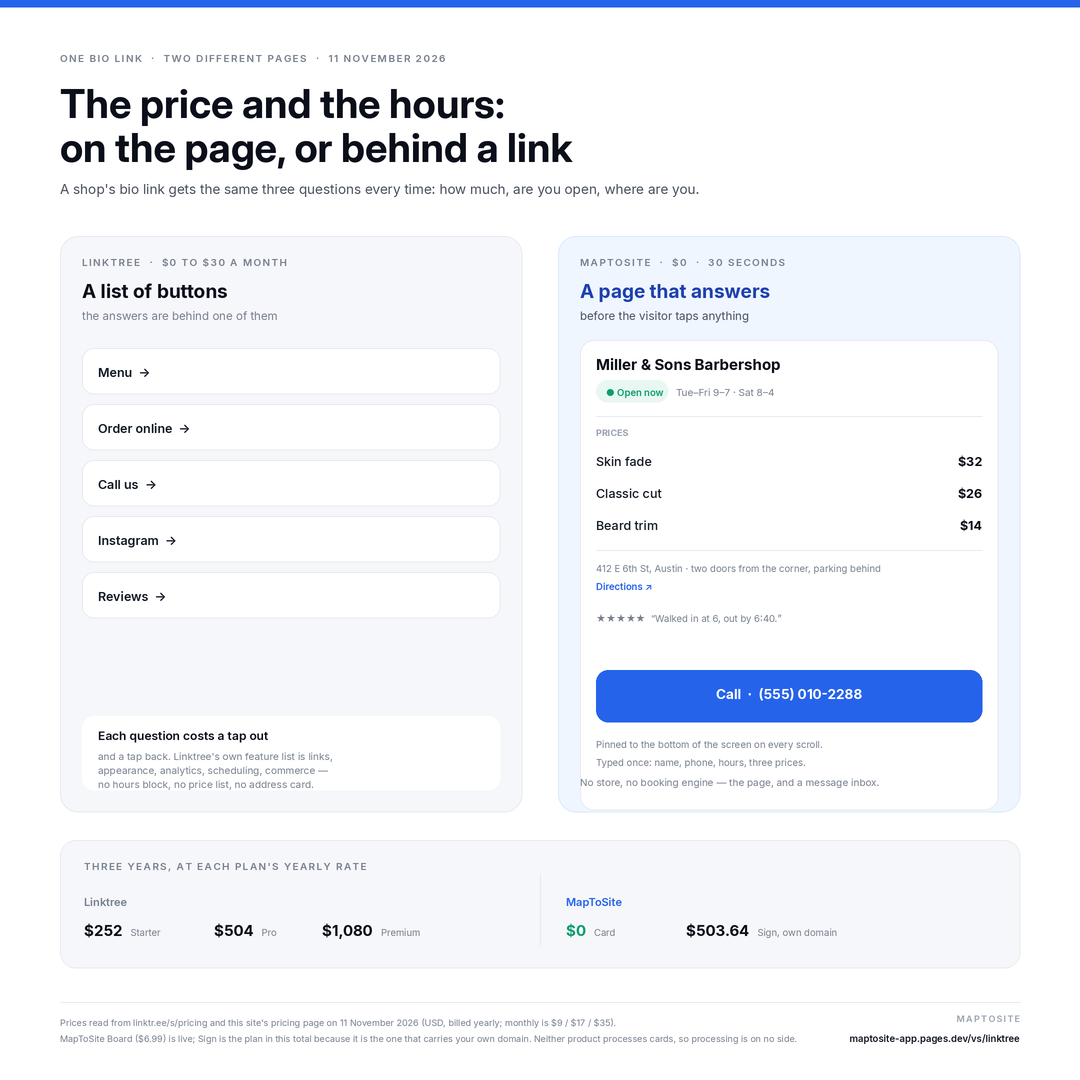
Yes, for one job: putting the answers a customer asks for — the price, the hours, where you are, how to call — on one page behind one link. A Linktree page is a stack of links; a MapToSite page holds the price list, the hours with an “open now” badge, your address with directions, review highlights and a call button pinned to the bottom of the screen. It is not a replacement for everything Linktree does: there is no commerce, no tips, no link scheduling and no app.
Does Linktree show my opening hours?
Not as hours on the page. Linktree's own feature list for a profile is links, appearance, analytics, link scheduling, commerce and integrations (linktr.ee/s/features, read 11 November 2026). You can add a link to a page that lists your hours, but then the customer leaves the Linktree page to read them — and a bio link that sends people away twice loses the ones who wanted one answer.
Both have a free plan. What is the difference?
Linktree Free is $0 with unlimited basic links and email/phone sign-ups. MapToSite Card is $0 forever with no card and no account, and the page itself carries the price list, hours, address, reviews and call button. The difference is not the price, it is what the visitor finds without tapping: on a link list, nothing but the buttons.
What does MapToSite cost after the free plan?
Card is $0 forever. Board is $6.99 a month and is live now: a six-photo gallery, a notice line under your name, and no “Free page” line in the footer. Sign is $13.99 a month at its launch price (list $20.99), live now, and adds your own domain, the page built for you once by us, and priority support. Payments are taken on Polar's checkout page, never on this site, and you can cancel from the receipt.
Can I keep my Linktree and use MapToSite too?
Yes, and that is the usual first step: publish the MapToSite page, then put it as the first button on your Linktree — “Menu, hours, prices”. When the bio link is the MapToSite page instead, the answers are one tap away instead of two.
Do I need my Google listing, a logo or photos?
No. Pick your business type, type your name, phone, hours and your three most-asked prices, and the page is complete. A photo and a Maps link are optional; the page works without them and never invents a fact you did not type.
Can Google find the page?
Yes. A published page is a public address such as /s/your-shop with its own title, description and preview image, and published English pages are listed in this site's sitemap. Demo pages are kept out of search on purpose.
Does MapToSite take orders or payments?
No, and it does not pretend to. There is no card processing and no commission: a customer who wants to book or ask something leaves a name, contact and message on the page, and it arrives in the page's inbox in your dashboard, newest first. If you sell online you need a shop, not this page.
Where the numbers come from.
Linktree plans and prices:
linktr.ee/s/pricing
(Free $0 · Starter $7/mo billed annually, $9 monthly · Pro $14/mo annually, $17 monthly · Premium $30/mo annually, $35 monthly · Teams from $49/mo), read 11 November 2026 in USD; prices vary by region and are shown in local currency on the checkout page.
Linktree's feature set (links, appearance, analytics, link scheduling, commerce, integrations):
linktr.ee/s/features, same date.
MapToSite plans and prices: this site's
pricing section — Card $0, Board $6.99, Sign $13.99 (list $20.99). Three-year totals are 36 × the monthly figure. Linktree is a trademark of Linktree Pty Ltd; MapToSite is not affiliated with it.
The longer version of this argument, with the three questions to ask any vendor before you enter a card:
Why paying $9/mo for Linktree hurts your local business.
Two questions, one page, thirty seconds.
Type your shop name, your hours and three prices. The page is live before your coffee is cold — free, with no card and no account.
Already decided? The three plans, on one line
Card is free with no card and no account. Board ($6.99) and Sign ($13.99) add the six-photo gallery, remove every MapToSite line and — on Sign — connect your own domain. Sign costs $13.99 a month against Linktree Pro's $14, for a page that answers the price and the hours instead of linking to where they might be.
Monthly, cancel any time — no lock-in. Card details are entered on Polar's checkout page, never on this site. Polar emails a license key; paste it on your dashboard and the plan is applied to your page.